Underlines appear right where you write.
Nothing to paste, nothing to open. Mail, Slack, Notes, Word, Pages, browser fields — everywhere a cursor blinks.
TidyWrite quietly lives in your menu bar and corrects spelling, grammar and tone as you type — inside Mail, Slack, Notes, Word, Pages and your browser. No copy-paste. No switching windows.
Works in Mail · Notes · Slack · Word · Pages · Safari · Chrome — and more.
Browser extension and Windows coming soon.
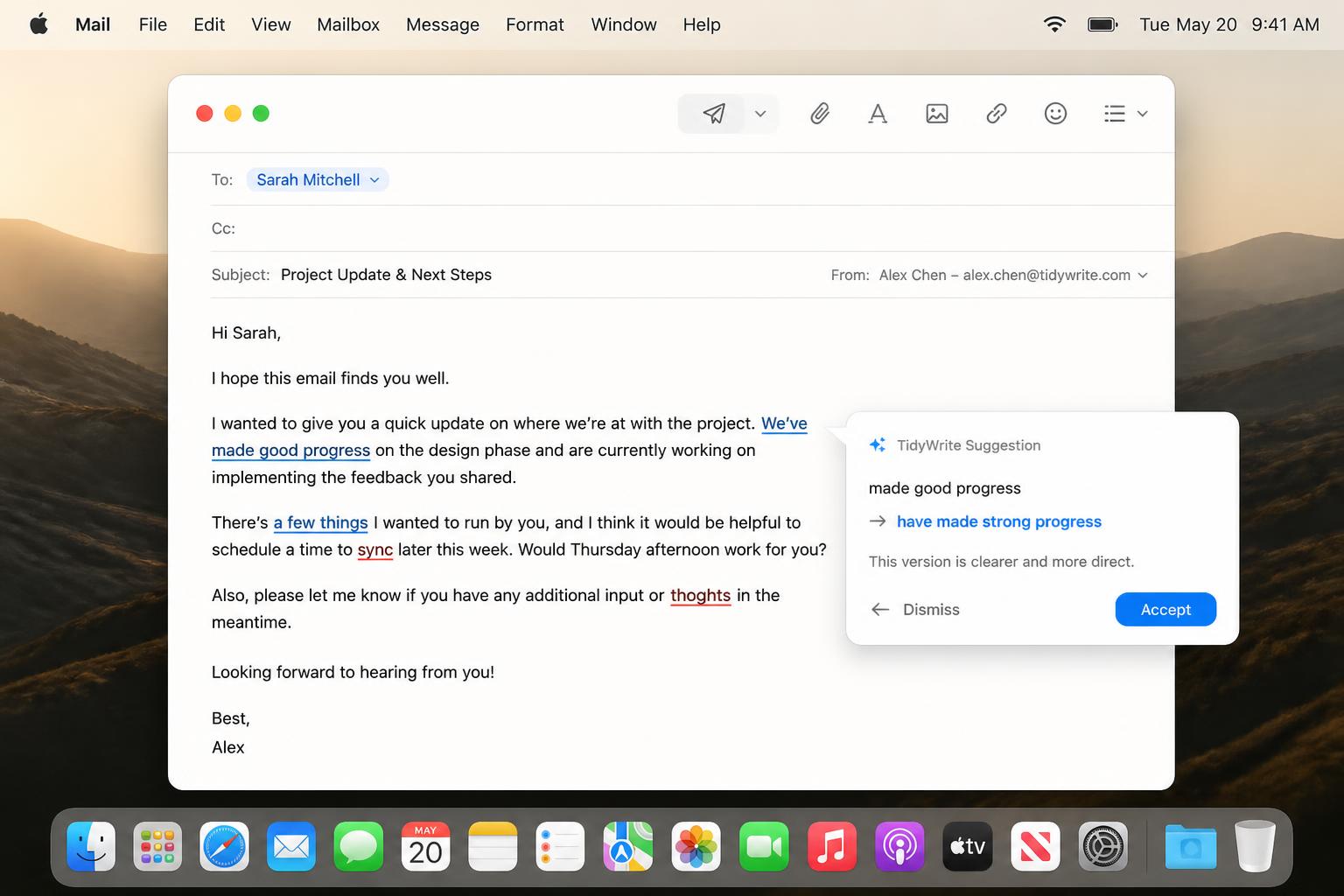
Lives inside the apps you already use
No web editor. No browser tab. TidyWrite reads and fixes the text where you already write.
Nothing to paste, nothing to open. Mail, Slack, Notes, Word, Pages, browser fields — everywhere a cursor blinks.
Instant spelling the moment you stop typing, plus AI grammar and style for the subtle mistakes basic checkers miss.
Formal, casual, friendly, professional, academic. Rewrite or paraphrase with a clear before / after preview.
TidyWrite uses Apple's Accessibility API to read the text field you're focused on — and only that. Nothing leaves your Mac unless an AI rewrite is requested.
TidyWrite sits quietly in your menu bar — about 28MB, ready in seconds.
Colored underlines flag spelling, grammar and tone issues as you type, anywhere.
Accept a correction, rewrite the whole sentence, or change the tone with one click.
Fast, private, and quiet. TidyWrite was engineered to feel like part of macOS itself.
AI spots grammar and style errors a dictionary never could — passive voice, missing articles, awkward phrasing.
Tap an underline → accept the suggestion. Done. No menus, no friction.
Turn rough drafts into polished writing instantly, with a clear before / after diff.
Formal · Casual · Friendly · Professional · Academic. Pick the room you're writing for.
Teach it your names, brands and slang — it stops flagging them, forever.
Underlines hide while you scroll. The menu bar icon is the only thing you'll see.
Built natively for macOS using Apple's Accessibility API. Spelling runs entirely on-device. Grammar and rewrite requests are encrypted in transit and never logged, sold, or used to train models.
Join the waitlist and we'll send you an invite as soon as the next alpha batch opens.